
How to Spot a Phishing Email: 9 Red Flags to Know

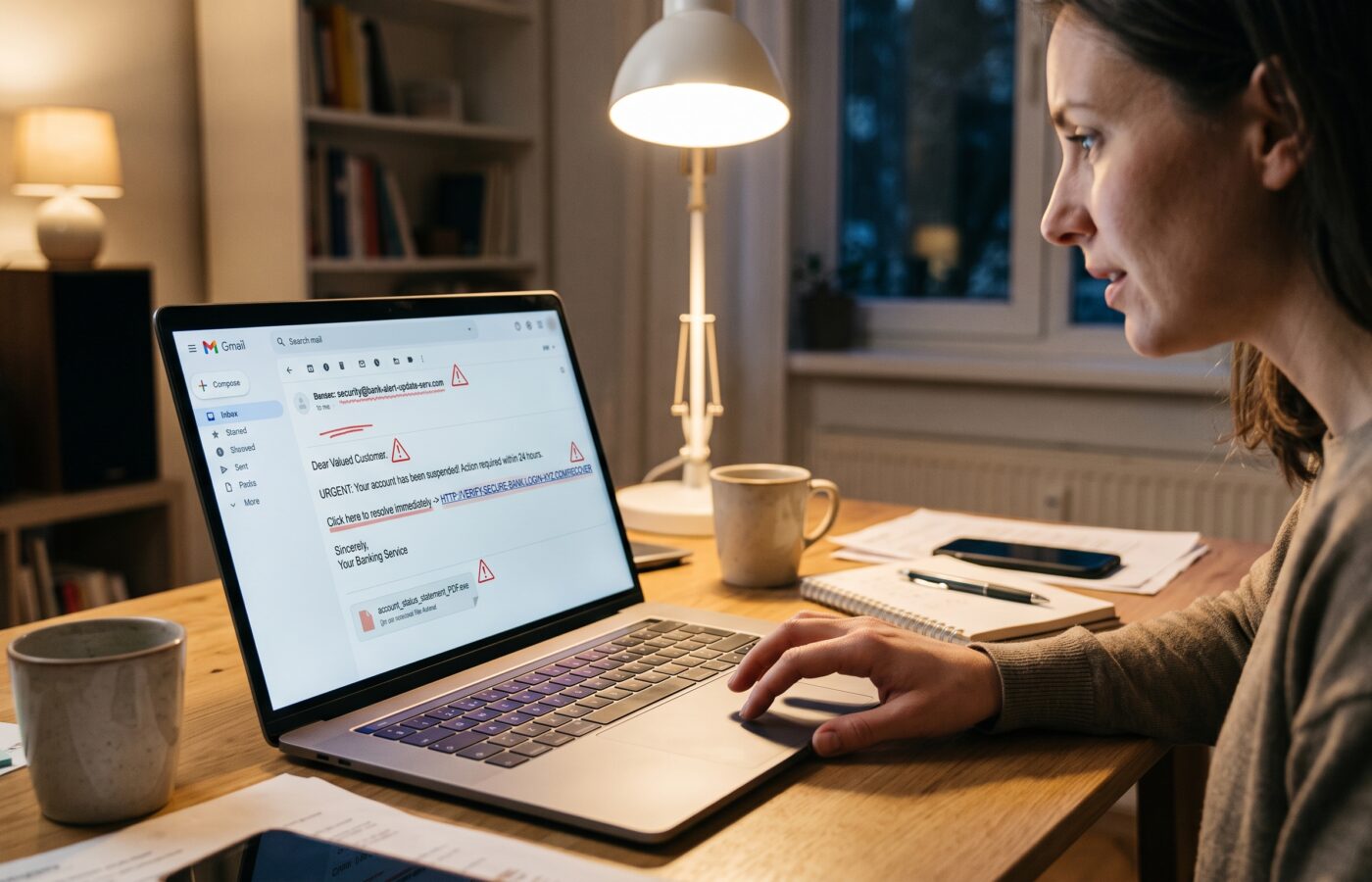
Every training session I run on how to spot a phishing email starts the same way. I put a real email on the screen, one that landed in someone’s inbox the week before, and I ask the room a simple question: would you click this?
Usually about half the hands go up. Then I show them where the link actually goes, and the room goes quiet.
That quiet moment is the whole point of my job. After years of teaching people how to spot a phishing email, I have learned that nobody falls for these messages because they are careless or unintelligent. They fall for them because the email arrived at 4:47 on a Friday, it looked like their bank, and it said their account would be locked in an hour. Phishing works on ordinary human instincts: helpfulness, fear, curiosity, and the very reasonable desire to clear your inbox and go home.
So this guide is not about making you paranoid. It is about giving you a short mental checklist you can run in about ten seconds, which in my experience is the difference between a near miss and a very long week.
Why Knowing How to Spot a Phishing Email Still Matters in 2026
You might assume that spam filters and smarter email platforms have mostly solved this problem. The numbers say otherwise.
In terms of complaint volume, phishing topped the FBI’s 2025 list with 191,561 complaints, ahead of extortion, investment fraud, and personal data breaches. Complaint counts dipped slightly from 2024, but reported losses from phishing attacks climbed from $70 million to $215.8 million. In other words, fewer people reported being hooked, but each successful hook did far more damage.
And phishing is often just the front door. Business email compromise, which very often begins with a convincing email, generated 24,768 complaints and roughly $3.047 billion in reported losses. For the first time in its nearly 25 year history, the IC3 report also included a section on AI, linking more than 22,000 complaints to nearly $893 million in losses.
Globally the picture is the same. The Anti Phishing Working Group observed 3.8 million phishing attacks during 2025, up slightly from 3.76 million in 2024.
The Ten Minute Window to Spot a Phishing Email
What worries me most as a trainer, though, is not the volume. It is the speed. CISA’s assessment research found that 84% of employees who fell for a phish did so within just 10 minutes of receiving it. The same findings showed only 13% of employees report phishing, which seriously limits an organization’s ability to detect or respond.
Ten minutes. That is less time than it takes most security teams to even see the alert. Which means the person reading the email is the last line of defense, and the first one too. Knowing how to spot a phishing email is no longer an IT skill; it is an everyday one.
The Old Advice on How to Spot a Phishing Email Is Aging Badly
Before we get to the red flags, I want to retire one piece of advice I hear constantly: “Just look for spelling mistakes.”
For years, that was decent guidance. Many scam emails really were riddled with errors. But the advance of artificial intelligence has improved the quality of phishing emails, and the polished, grammatically perfect phish is now routine. The same tools that help people use AI at work help attackers write cleaner lures. The UK’s National Cyber Security Centre puts it plainly: scams used to be easier to spot, but they are getting smarter and some even fool the experts.
So if your entire defense is a grammar check, you are defending against 2015. Today, how to spot a phishing email comes down to things that are much harder for an attacker to fake: where the email really came from, where the links really go, and whether the request makes sense in your actual life.
Red Flag 1: Spot a Phishing Email by Its Sender Address
The display name says “PayPal Support” or “Microsoft Account Team.” That part costs the attacker nothing; anyone can type any name they like into that field. What matters is the actual address behind it.
On a desktop, hover over or click the sender name to reveal the full address. Phone users can tap the name. Then read the domain slowly, letter by letter, from the @ symbol to the end.
Microsoft warns that scammers use addresses that look nearly identical to real ones but with small differences, such as a zero swapped in for the letter o in “microsoft.” Other tricks I see weekly include extra words bolted onto the brand (“accounts support,” “secure notice”), a different ending like .co instead of .com, or a free webmail account pretending to be a company. A generic Gmail or Yahoo address standing in for a company domain is a classic sign.
A related trick: the email comes from one address, but when you hit reply, the reply goes somewhere else entirely. Always glance at the “To” field of your reply before you send anything back.
CISA uses a training example of an employee named Omar who should have noticed the email address was not from his vendor’s real domain, and who handed over his login credentials as a result. Omar is a cartoon, but I have met dozens of real Omars.
Red Flag 2: A Ticking Clock
“Your account will be suspended in 24 hours.” “Final notice.” “Respond immediately or legal action will follow.”
Urgency is the single most reliable lever in a phisher’s toolkit, because panic shuts down the careful part of your brain. The FTC notes that scammers pressure you to act now, or else something bad will happen.
Here is the rule I give every group I train: the more urgent the email feels, the slower you should go. Real organizations do send deadlines, but they rarely demand that you fix a serious problem by clicking a link in the next sixty minutes. And if the problem is real, it will still be real when you log in the normal way, through the app or a bookmark you already trust.
Red Flag 3: Spot a Phishing Email by Where Its Links Really Go
The text of a link and the destination of a link are two completely separate things. A button can say “View Your Invoice” and point anywhere on the internet.
Microsoft advises hovering over links without clicking to see where they really lead, and treating misspellings, extra characters, or unfamiliar domains as warning signs. On mobile, press and hold the link to preview the address instead of tapping it.
When you read a web address, the part that matters is the domain right before the first single slash. A link like yourbank.com.account.verify.example.net is not your bank. It belongs to whoever owns example.net, and the name of your bank is just decoration at the front.
Watch for link shorteners and redirect services too. They are not automatically malicious, but in an unexpected email they hide the destination, which is exactly what an attacker wants.
Red Flag 4: It Asks for Things Nobody Should Ask for by Email
Passwords. One time codes. Bank details. Your Social Security number. A photo of your ID.
Legitimate organizations go to great lengths to avoid asking for these through email, because they know email is not a safe channel. Microsoft notes that IT support usually does not ask employees to reset passwords through email links. Your bank will never need your full password, and no real security team will ever ask you to read them a verification code that just arrived on your phone.
That last one deserves extra attention. Attackers increasingly pair an email with a follow up phone call or text: “We just sent you a code to confirm your identity, can you read it back to me?” That code is the key to your account. The moment someone asks for it, you know exactly who you are dealing with.
Red Flag 5: Spot a Phishing Email by Its Unexpected Attachment
The FTC lists common phishing stories that push you to open something, including claims of suspicious activity, problems with your account or payment information, and fake invoices.
In my sessions, the attachments that cause the most trouble are invoices, shipping documents, “scanned” files from a copier, voicemail notifications, and HR documents about salary or policy changes. They are designed to be boring enough to seem routine and important enough to open.
Be especially careful with attachment types that can run code or open a web page: HTML files, compressed archives, disk images, and any document that tells you to “enable editing” or “enable content” before you can read it. That instruction is almost never about reading. It is about running something on your machine.
If you were not expecting the file, verify with the sender using a contact method you already have, not the one in the email.
Red Flag 6: A Payment Change, a Gift Card, or a Secret
This is the red flag that costs businesses the most money, and it often contains no link and no attachment at all. It is just a request.
“Our bank details have changed, please update them before you pay this invoice.” “I’m in a meeting, can you buy five gift cards for a client and send me the codes?” “This acquisition is confidential, don’t mention it to anyone, just process the transfer today.”
Microsoft points out that the sender’s address in these schemes is often only slightly different from the real executive’s, for example a .co ending instead of .com. Sometimes the attacker has actually broken into a real vendor’s mailbox, so the address is perfect and the message arrives inside a genuine email thread.
That is why the fix here cannot be “check the address” alone. The fix is a process: any change to payment details, and any unusual request for money, gets confirmed by phone, using a number you already had on file. Every time. No exceptions for the CEO. Especially not for the CEO.
The request for secrecy is its own red flag. Legitimate business does not depend on you keeping quiet about it.
Red Flag 7: Spot a Phishing Email Hiding Behind a QR Code
This one is newer, and people are much less suspicious of it.
The NCSC warns that criminals are increasingly using QR codes inside phishing emails to trick people into visiting scam websites, and that while QR codes are usually fine in pubs and restaurants, you should be wary of scanning them in emails.
Think about why this works. A QR code is an image, so many email filters cannot read the link hidden inside it. And when you scan it, you move the whole interaction from your monitored work laptop to your personal phone, where the screen is smaller, the full address is harder to read, and your company’s protections usually do not reach.
My rule: if an email asks you to scan a QR code to “reauthenticate,” “view a secure document,” or “set up multifactor authentication,” treat it exactly like a suspicious link. Go to the service directly instead.
Red Flag 8: Spot a Phishing Email When the Story Does Not Fit Your Life
This is the red flag I spend the most time on in training, because it beats AI written phishing every time. If you want to know how to spot a phishing email that has flawless grammar and a perfect logo, this is the check that catches it.
Ask yourself: does this message make sense for me, right now?
Think of a delivery problem for a package you never ordered, or a refund from a service you don’t use. Maybe a colleague who has never shared a file with you suddenly sends a document. Perhaps a password expiry notice arrives from a system your company does not even run. Then there is the “missed call” voicemail sent by email when your phone shows no missed call at all.
The NCSC notes that criminals often exploit current news stories, big events, or specific times of year, like tax season, to make their scams feel more relevant. They also use information about you that is available online, including on social media, to make messages more convincing. So a phish may mention your real employer, your real manager, or a conference you really attended. That makes it feel personal. It does not make it legitimate.
Generic greetings like “Dear Customer” or “Dear User” are still worth noticing, but the reverse is just as important now: a message that knows a surprising amount about you is not proof of anything.
Red Flag 9: The Offer Is Too Good, or the Threat Is Too Scary
Phishing tends to live at the emotional extremes. Maybe you have won something, or a refund is supposedly waiting for you. Sometimes it is a surprise bonus. On the darker side, the email claims you are under investigation, your account has been hacked, or a warrant has been issued.
CISA advises resisting the temptation to click links or attachments that seem too good to be true. The flip side holds as well. Messages engineered to frighten you are built for the same purpose: to make you react before you think.
Whenever an email makes you feel a sudden spike of excitement or dread, treat that feeling as data. Pause. Breathe. Then go verify through a channel you control.
The Ten Second Check: How to Spot a Phishing Email Fast
If you remember nothing else from this article, remember this short routine for how to spot a phishing email. I have people practice it until it becomes automatic:
- Who really sent it? Check the full address, not the display name.
- Where does it really go? Hover or long press every link before you touch it.
- What does it want? Credentials, codes, money, or a file opened? Slow down.
- Does it fit my life? Was I expecting this, from this person, right now?
- How do I verify? Use the app, a saved bookmark, or a known phone number. Never the contact details inside the email.
None of these steps requires technical knowledge. That is deliberate. Learning how to spot a phishing email is less about being a computer expert and more about building a habit of checking before acting.
What to Do When You Spot a Phishing Email
Knowing how to spot a phishing email is only half the job. Reporting it is what protects the next person.
CISA recommends reporting the phish to protect yourself and others, noting you will typically find reporting options near the sender’s address or through the “report spam” button. At work, use whatever your organization provides, often a “Report Phishing” button in Outlook or Gmail, and follow your security team’s process.
Reporting is worth the extra click. According to the Verizon 2025 Data Breach Investigations Report, people who had been trained within the past 30 days had a median phishing reporting rate of 21%, far higher than those whose training was stale. Regular practice genuinely changes behavior.
If you are in the United States, you can also report to the FTC and to the FBI’s IC3. In the UK, you can forward scam emails to the NCSC for free at report@phishing.gov.uk, as explained on its scam email reporting page. Internationally, the APWG accepts reports at reportphishing@apwg.org.
A few things not to do: don’t reply to the sender, don’t forward it to coworkers to ask “is this real?”, and don’t click the unsubscribe link to make it stop. All of those can confirm your address is active or spread the risk.
What to Do If You Already Clicked
It happens. Even security professionals have been caught. The worst thing you can do is stay quiet out of embarrassment.
If you clicked a link or opened an attachment at work, tell your IT or security team immediately. Minutes matter here, and a good security team will thank you, not blame you.
Entered a password? Change it right away, starting with that account and any other account where you reused the same password. Turn on multifactor authentication if it is not already on, and where you can, prefer authenticator apps or passkeys over text message codes.
Shared bank or card details? Call your bank using the number on the back of your card. If money was sent, report it to your bank and to law enforcement as fast as possible, because recovery chances drop quickly with time. This is also where the debit card vs credit card choice matters, since fraud on a debit card pulls money straight from your account. The NCSC notes that if you have lost money or been hacked after responding to a phishing message, you should report it as a crime through the proper channel.
A Final Word From the Training Room
Every year someone in a session asks me, a little defensively, whether all this checking is really necessary. “I can usually tell,” they say.
Maybe. But attackers only need you to miss one. And they are betting on the one that arrives when you are tired, distracted, and trying to help.
The goal is not perfection. What you need is a pause. Ten seconds between reading and clicking, long enough to ask who sent this, where it goes, and whether it fits your life. That pause is the heart of how to spot a phishing email, and it is the most effective security control I know of. It costs nothing.
Frequently Asked Questions
What is the fastest way to spot a phishing email?
The quickest way to learn how to spot a phishing email is to check the full sender address and hover over any link before clicking. If the domain does not match the organization exactly, treat the email as suspicious. Microsoft’s guide to recognizing phishing emails walks through these checks with examples.
Can you spot a phishing email if it looks completely professional?
Yes, but not by grammar alone. AI tools now let attackers write clean, convincing messages, so spelling errors are no longer a reliable sign. The NCSC explains this shift in its guidance on how to spot scams.
Is it safe to open a phishing email if I don’t click anything?
Simply opening an email in a modern, updated mail app is generally low risk. The danger comes from clicking links, opening attachments, scanning QR codes, or replying. The FTC’s article on how to recognize and avoid phishing scams covers safe next steps.
Where should I report a phishing email once I spot it?
At work, use your organization’s report button or security team. In the US, you can report to the FTC and the FBI’s IC3. In the UK, forward it to report@phishing.gov.uk as described by the NCSC. CISA’s Recognize and Report Phishing page explains the basics.
Why are QR codes in emails a phishing risk?
QR codes hide the destination address and move you onto your phone, where filters and protections are weaker. See the NCSC’s scam spotting guidance.
What should I do if I entered my password on a phishing site?
Change that password immediately, plus any account sharing it, turn on multifactor authentication, and alert your IT team or bank. The FTC’s phishing guidance includes a section on what to do after responding to a phishing email.
Does security awareness training actually reduce phishing risk?
Yes, especially when it is frequent. Training that teaches people how to spot a phishing email works best when it is repeated, and Verizon’s 2025 Data Breach Investigations Report found recently trained employees report phishing at much higher rates.
References
- Federal Trade Commission. How to Recognize and Avoid Phishing Scams
- Cybersecurity and Infrastructure Security Agency (CISA). Recognize and Report Phishing
- Cybersecurity and Infrastructure Security Agency (CISA). Phishing Infographic
- Federal Bureau of Investigation. Internet Crime Complaint Center Annual Reports
- HIPAA Journal. FBI Internet Crime Complaint Report 2025
- Help Net Security. Cybercrime Losses Break the $20 Billion Mark
- Verizon. 2025 Data Breach Investigations Report
- Anti Phishing Working Group. Phishing Activity Trends Report, 4th Quarter 2025
- National Cyber Security Centre (UK). Spot and Report Scam Emails, Texts, Websites and Calls
- NCSC. Spot Scams
- NCSC. Report a Scam Email
- Microsoft Security. What Is a Phishing Email?