
What Is Two-Factor Authentication and Should You Use It?
If you’ve ever asked yourself what is two-factor authentication and whether it’s worth the bother, let me answer with a story first. A few years into my career, a client called me on a Monday morning in a panic. Over the weekend, her business email had been sending invoices with new bank details to her customers, and two of them had paid. Her password wasn’t weak, either. In fact, it was twelve characters with a capital letter, a number and a symbol. The trouble was that she had also used that same password on a small online shop that got breached a year earlier. As a result, someone bought that list, tried her email address and password on her mail provider, and walked straight in.
Since then, I’ve had some version of that call more times than I can count. Almost every time, one setting would have stopped it. So when people ask me whether 2FA is worth turning on, my short answer is yes. However, the longer answer is that the type you choose matters a lot more than most guides admit, and that’s what this article is about.
What Is Two-Factor Authentication, in Plain Terms?
Two-factor authentication, usually called 2FA, means a service asks for two different kinds of proof before it lets you in. Your password is the first one. The second, however, has to come from a different category.
Generally, security people sort these proofs into three categories:
- Something you know. For example, a password, a PIN or the answer to a security question.
- Something you have. For instance, your phone, a hardware security key or a bank card.
- Something you are. Finally, your fingerprint, your face or your voice.
The idea is simple. A criminal on the other side of the world can steal your password from a data breach in seconds. Getting hold of your phone or your fingerprint at the same time, on the other hand, is a much bigger job. Therefore, they need both to get in.
Two Steps Are Not Always Two-Factor Authentication
One point catches people out, though. For example, if a site asks for your password and then the name of your first pet, that’s two steps but only one factor, because both are things you know. Moreover, anyone who has your password from a breach can probably find your pet’s name on your social media in about five minutes. Real 2FA, by contrast, mixes categories. The NIST digital identity guidelines, which US federal agencies and plenty of private companies use as a benchmark, are strict about this. In other words, a second factor has to be a different kind of evidence, not just a second question.
2FA, MFA and Two Step Verification
You’ll also see “multifactor authentication,” or MFA. Essentially, it’s the umbrella term for two or more factors. In practice, most MFA you meet as an ordinary user is 2FA, so the terms get used interchangeably. Similarly, some companies say “two step verification” instead, which is the same idea with a different label.
Why Passwords Alone Need Two-Factor Authentication
Passwords used to be the whole lock. Now, however, they’re more like a name tag, because plenty of people already have yours.
Every year I read the Verizon Data Breach Investigations Report, since it’s one of the few big studies based on real incident data rather than vendor surveys. In the 2025 edition, stolen credentials were once again the most common way attackers first got in, at 22 percent of breaches. That put them ahead of exploited vulnerabilities and phishing. Furthermore, it was the second year in a row credentials topped the list.
How Credential Stuffing Works
The reason is credential stuffing. When a site leaks its user database, those email and password pairs end up for sale or posted free. Then attackers load them into automated tools that try every pair against banks, email providers, retailers and cloud services. Because so many people reuse passwords, even a small success rate across millions of attempts adds up to a lot of compromised accounts.
US cyber authorities take this seriously. In fact, CISA, the federal cybersecurity agency, added single factor authentication to its list of bad practices and called password only access to remote and administrative systems exceptionally risky. So when a government agency puts “just a password” on the same list as unsupported software, the message is fairly clear.
To be clear, I still want people to use strong, unique passwords, ideally stored in a password manager. Still, a strong password does nothing once it’s been stolen. A second factor, on the other hand, does.
How Two-Factor Authentication Works Behind the Scenes
From your side, it feels simple: type the password, then do the second thing. Underneath, though, a few different systems are at work depending on the method.
Authenticator App Codes
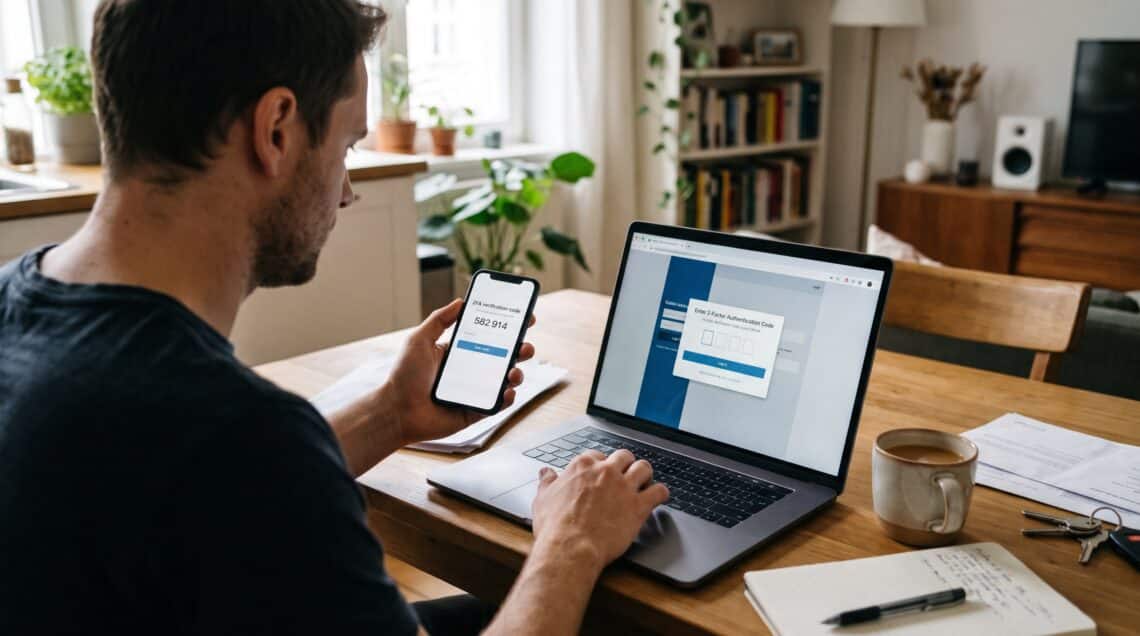
Take the most common one, for example, the six digit code from an authenticator app such as Google Authenticator, Microsoft Authenticator or Authy. When you turn it on, the website shows you a QR code. That code holds a secret key, and both your app and the website’s server store it. Then, every thirty seconds, both sides run the secret and the current time through the same maths and get the same six digit number. When you type the code, the server checks whether your number matches its own. Because no internet connection is needed on your phone, these apps even work on a plane.
Text Message Codes
Text message codes, by contrast, work differently. First, the server generates a random code. Next, it sends that code to your phone number through the mobile network. Finally, you read it and type it in.
Security Keys and Passkeys
Hardware keys and passkeys are the most interesting and also the strongest. Specifically, they use public key cryptography. When you register, your device creates a pair of keys. The website keeps the public key, while the private key stays on your device and never leaves it. Later, at login, the site sends a challenge, your device signs it with the private key, and the site checks the signature. Most importantly, that signature is tied to the real website’s address. As a result, a fake login page on a lookalike domain gets nothing it can reuse. If you want the technical version, the FIDO Alliance explains how this works in more depth.
The Main Types of Two-Factor Authentication, Ranked
This is where most articles let readers down, because they list the methods as if they were equal. They aren’t. So here’s how I rank them, from weakest to strongest.
1. SMS and voice call codes
SMS is better than nothing, and sometimes it’s the only option a site offers. Even so, it’s the weakest form of 2FA. For one thing, your phone number can be stolen through a SIM swap, where a criminal convinces your carrier to move your number to a SIM card they control. In addition, codes can be intercepted through weaknesses in the phone network itself. That’s why NIST lists SMS and voice as “restricted” authenticators. Consequently, organizations that rely on them have to accept the risk and offer users something better.
2. Email codes
Email codes have a similar weakness, plus one more. If your email is the account being protected, then sending the code to that same inbox doesn’t add much. So they’re fine for low value accounts, but I wouldn’t rely on them for anything important.
3. Authenticator app codes
Authenticator apps are a big step up. Because nothing travels over the phone network, SIM swaps don’t help an attacker. For most people, therefore, this is the practical default. The weakness, however, is phishing. If you type a code into a convincing fake page, the attacker can pass it to the real site within seconds. Knowing how to spot a phishing email is your best defense here.
4. Push notifications, ideally with number matching
With push, you get a prompt on your phone asking “Is this you?” and you tap approve. It’s convenient, but plain yes or no prompts can be abused, as I’ll explain below. The better version, therefore, is number matching, where the login screen shows a number and you type it into your app. Notably, CISA has published guidance on number matching and MFA and calls it a good interim step for organizations that aren’t yet ready for the strongest option.
5. Hardware security keys and passkeys
Finally, this is the top tier. A hardware key is a small device, often on a keyring, that you plug in or tap against your phone. Similarly, a passkey does the same job using your phone or laptop, unlocked with your fingerprint, face or PIN. Both are what the industry calls phishing resistant. In fact, CISA’s guide to implementing phishing resistant MFA calls this the gold standard and names FIDO and WebAuthn as the only widely available phishing resistant option.
Meanwhile, passkeys have moved quickly in the last couple of years. Apple, Google and Microsoft all support them now, and the latest NIST revision also accepts synced passkeys at its second assurance level. So if a site offers passkeys, I usually take them.
What the Numbers Say About Two-Factor Authentication
Because I’m skeptical of security marketing, I like evidence from large studies with real data. Three are worth knowing.
Google’s Account Hijacking Study
The first comes from Google. In 2019, Google worked with researchers from New York University and UC San Diego on a year long study of account hijacking. Even today, their findings on basic account hygiene are some of the clearest data available. For example, an SMS code blocked every automated bot attack, 96 percent of bulk phishing and 76 percent of targeted attacks. On device prompts, however, did better, stopping 99 percent of bulk phishing and 90 percent of targeted attacks. Moreover, among users who relied only on security keys, nobody fell to targeted phishing during the study.
Notice the gap between those methods. Although every method stopped the bots, the method made a real difference once a real person was targeting you.
Microsoft’s 99.9 Percent Finding
The second comes from Microsoft. At the time, Alex Weinert, who led identity security there, said accounts using MFA were more than 99.9 percent less likely to be compromised. He based that on the hundreds of millions of fraudulent sign in attempts Microsoft saw every day. For more context, Slaw’s write up of that research covers it well. Interestingly, the remaining fraction was mostly sophisticated attacks built to capture codes in real time.
Google’s Security Key Rollout
The third, though, is my favourite. In early 2017, Google required all of its more than 85,000 employees to use physical security keys. Then, a year and a half later, the company told KrebsOnSecurity it had seen no reported or confirmed account takeovers since. Keep in mind this is a company that state sponsored groups target constantly. In short, that result is what phishing resistant authentication looks like in practice.
Where Two-Factor Authentication Falls Short
That said, 2FA doesn’t make you untouchable, and anyone who claims it does is selling something. Below are the weak points I see most often.
SIM swapping
First, criminals call your mobile carrier, pretend to be you, and ask for your number to be moved to a new SIM. Sometimes they even bribe an insider. Once they have your number, every text code goes to them instead of you. For this reason, the FBI issued a public service announcement on SIM swap schemes. It received 1,611 SIM swapping complaints in 2021, with losses of more than $68 million, compared with 320 complaints across the three years before. That’s the main reason I push people off SMS codes for important accounts.
Push fatigue
In September 2022, an attacker who had bought an Uber contractor’s password kept triggering login prompts on that person’s phone, over and over. Then they messaged the contractor on WhatsApp, pretending to be from Uber IT, and said the prompts would stop once one was approved. Eventually, the contractor approved one. BleepingComputer’s coverage of MFA fatigue attacks goes through how that played out. The lesson, therefore, is that a yes or no button relies on a tired human saying no every single time. Number matching and security keys, by contrast, remove that weak spot.
So if you ever get a login prompt you didn’t start, don’t approve it. Ever. Instead, change your password right away, because a prompt you didn’t trigger means someone already has it.
Real time phishing proxies
Modern phishing kits sit between you and the real website. When you type your password and your code into the fake page, the kit passes both to the real site immediately and then steals the session. Unfortunately, app codes and SMS codes can’t stop this. Only origin bound methods can, meaning security keys and passkeys, because they won’t sign anything for the wrong domain.
Weak account recovery
I’ve also seen well protected accounts taken over through the “forgot my password” link. For example, if recovery goes to an old email account with no protection, or to a phone number that can be swapped, then that path becomes the back door. Therefore, your recovery options need to be as strong as your login.
Locking yourself out
Lastly, this is the risk people worry about most, and it’s real. Google’s own study, for instance, found that 38 percent of users didn’t have their phone with them when asked for a challenge. So if you lose your only phone without backup codes, you could be stuck for days. Fortunately, the fix is simply planning ahead, which I cover next.
So, Should You Use Two-Factor Authentication?
Yes, without hesitation. Even the weakest version of 2FA wipes out the automated attacks behind most account takeovers. Once you understand what is two-factor authentication actually protecting you from, the extra five seconds at login looks cheap.
The better question, then, is which form to use where. Here’s my rule of thumb:
- Email, password manager, banking, and anything holding money or identity documents: passkeys or a hardware key if offered, and otherwise an authenticator app at minimum.
- Social media, cloud storage and work accounts: an authenticator app or passkeys. Also turn on number matching if your employer uses push prompts.
- Low stakes accounts like forums and loyalty programs: whatever is offered, even SMS, because some protection beats none.
Your email account, in particular, deserves special mention. It’s the master key to almost everything else, since nearly every other service sends password resets there. So if you only protect one account properly this week, make it your main email.
How I’d Set Up Two-Factor Authentication If I Were Starting Today
This is roughly what I walk friends and family through.
- First, start with a password manager. Generate unique passwords for every account. Notably, CISA recommends pairing a password manager with MFA for exactly this reason.
- Next, protect your primary email. Turn on 2FA with an authenticator app or passkey. Also remove old recovery phone numbers you no longer use.
- Then move to your password manager itself, followed by banking, your phone’s app store account (Apple ID or Google account), and finally social media.
- Save your backup codes. When you enable 2FA, almost every service gives you a set of one time recovery codes. Print them or store them in your password manager, but not in a screenshot sitting in the same phone’s camera roll.
- If you buy hardware keys, buy two. Register both on every account, and then keep one somewhere safe at home. Otherwise, losing your only key makes for a miserable afternoon.
- Put a PIN or port out lock on your mobile account. Most carriers offer one. As a result, SIM swaps become much harder even if you still use SMS somewhere.
- Finally, move from SMS to an app or passkey whenever a site lets you. Check your security settings every few months, too, because services keep adding better options.
All in all, doing this takes an evening. Recovering from a hijacked email account, by comparison, can take weeks.
Two-Factor Authentication for Small Business Owners
If you run a team, even one of five people, this matters more for you than for any individual. After all, one compromised mailbox can mean fraudulent invoices, leaked customer data and a very awkward conversation with your insurer. So require 2FA on email, your accounting software and any admin panels. Furthermore, don’t make exceptions for senior staff, because executives are often the most targeted people in the building and also the most likely to ask for an exception. If you’re just starting a small business, build this in from day one, because it’s far easier than adding it later.
Likewise, contractors need the same rules. Remember that the Uber breach started with a contractor account, not an employee one. In other words, if someone can log into your systems, they follow your security policy.
Final Thoughts on Two-Factor Authentication
Over the years, I’ve cleaned up after many account takeovers, and the pattern hardly changes. Typically, the password was stolen somewhere else, nobody had turned on a second factor, and so the attacker had an easy weekend. Admittedly, two-factor authentication won’t fix every security problem. However, it does fix the most common one, cheaply, and in a few minutes per account.
So, what is two-factor authentication in one sentence? Simply put, it makes sure a stolen password, on its own, gets a criminal nowhere. Therefore, turn it on, choose the strongest method each service offers, save your backup codes, and never approve a prompt you didn’t start.
Frequently Asked Questions About Two-Factor Authentication
What is two-factor authentication in simple words?
Simply put, it’s a login method that asks for two different kinds of proof, usually your password plus a code, prompt or key tied to your phone or another device. So even if your password leaks, the attacker still needs the second factor. For a plain language overview, see CISA’s MFA resource page.
Is two step verification the same as two-factor authentication?
Usually, yes, because companies use the terms interchangeably. Strictly speaking, however, two steps only count as two factors when they come from different categories, such as a password plus a phone. The NIST authentication guidelines also set out the formal definitions.
Is SMS two-factor authentication safe?
It’s much safer than a password alone. Still, it’s the weakest form of 2FA because of SIM swapping and interception, as the FBI’s SIM swap warning explains. Therefore, use an authenticator app or passkey for important accounts.
What happens to two-factor authentication if I lose my phone?
In that case, you can log in with the backup codes you saved when you set up 2FA, or with a second registered device or security key. Without either, however, you’ll need the service’s account recovery process, which can be slow. In fact, Google’s account hygiene research shows how common it is for people not to have their phone at hand.
Are passkeys better than two-factor authentication?
Passkeys are actually a stronger way to do the same job. They combine something you have, your device, with something you are or know, such as your fingerprint or PIN, and they also resist phishing. For more detail, the FIDO Alliance passkey guide explains how they replace passwords and SMS codes.
Can hackers bypass two-factor authentication?
Sometimes, yes, through SIM swaps, push fatigue or real time phishing pages. However, those attacks take more effort and are far less common than simple password theft. Moreover, phishing resistant methods like security keys close most of those gaps, as CISA’s phishing resistant MFA fact sheet describes.
Which accounts need two-factor authentication first?
First, protect your primary email. Then move on to your password manager, banking, phone app store account and social media. Email comes first because it controls password resets for nearly everything else.
References
- National Institute of Standards and Technology. Digital Identity Guidelines: Authentication and Authenticator Management (SP 800-63B-4).
- Cybersecurity and Infrastructure Security Agency. Implementing Phishing Resistant MFA Fact Sheet.
- Cybersecurity and Infrastructure Security Agency. More Than a Password: Multifactor Authentication.
- Verizon Business. 2025 Data Breach Investigations Report.
- Google Security Blog. New Research: How Effective Is Basic Account Hygiene at Preventing Hijacking.
- Slaw. Using Multifactor Authentication Blocks 99.9% of Account Takeover Attacks.
- KrebsOnSecurity. Google: Security Keys Neutralized Employee Phishing.
- Federal Bureau of Investigation, Internet Crime Complaint Center. Criminals Increasing SIM Swap Schemes to Steal Millions of Dollars from US Public.
- BleepingComputer. MFA Fatigue Attacks Are Putting Your Organization at Risk.
- SecurityWeek. CISA Expands Bad Practices List With Single Factor Authentication.
- FIDO Alliance. Passkeys.
- FIDO Alliance. How FIDO Works.
- Cybersecurity and Infrastructure Security Agency. Implementing Number Matching in MFA Applications

Daniel Arkwright
Daniel Arkwright is a Certified Business Coach and Advisor who helps founders build smarter plans and stronger businesses.


You May Also Like
How to Write a Business Plan: A Coach’s Step-by-Step Guide (With Free Template)
How to Free Up Storage on Your Phone (iPhone and Android)